The AI company you can fire.
FIRE US TOMORROW.YOUR WEBSITESTILL RUNS. — The AI company you can fire — your website still runs.
 ChatGPT
 Claude
Tell it. See it. Own it.
Chatterbuilt gives ChatGPT or Claude the tools to help build and maintain your website in accounts you control. You own every piece of the deployed website. Your agent prepares the change. You review the draft. You decide what ships.
What you keep if you leave
The website is an asset, not a hostage.
- Your website files
- Your hosting account
- Your domain
- Your version history
You lose Chatterbuilt's hosted tools and future updates — not the deployed website. Domain costs continue, and a business site may require paid commercial hosting.
See it first
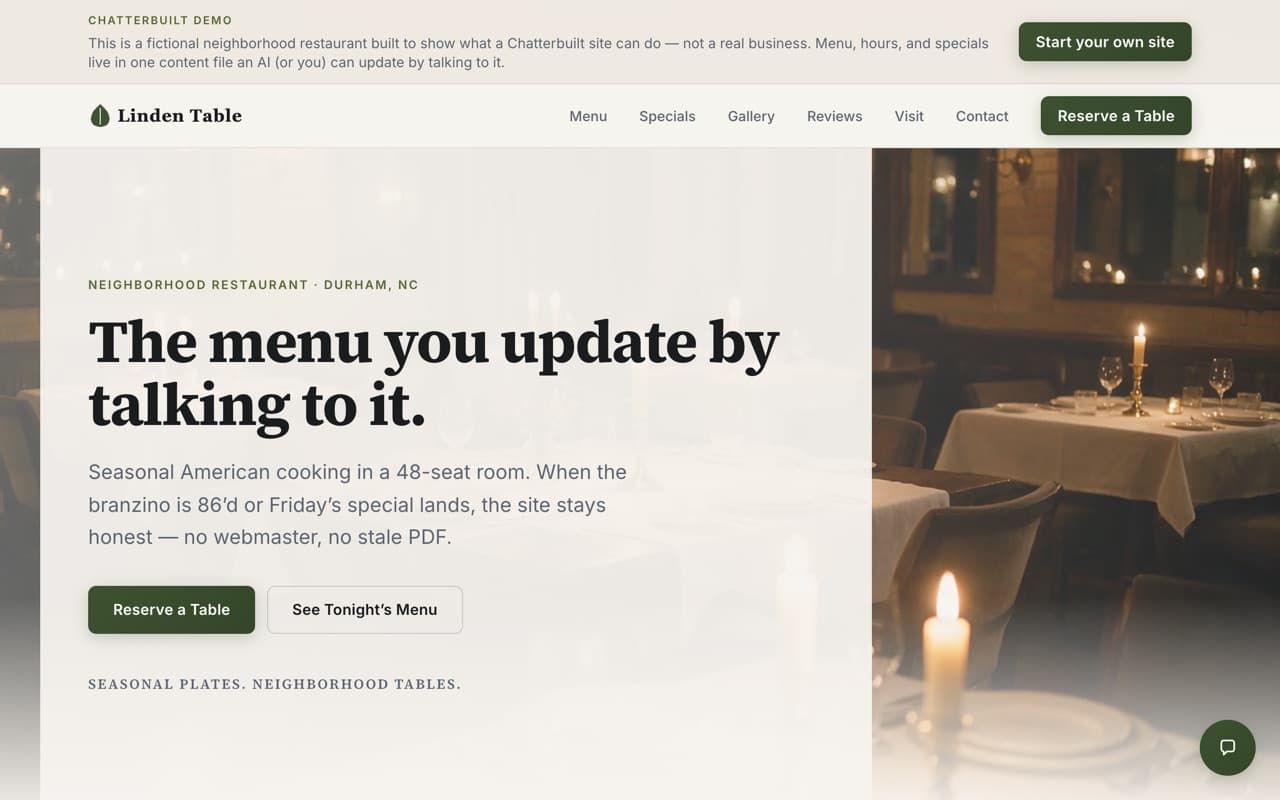
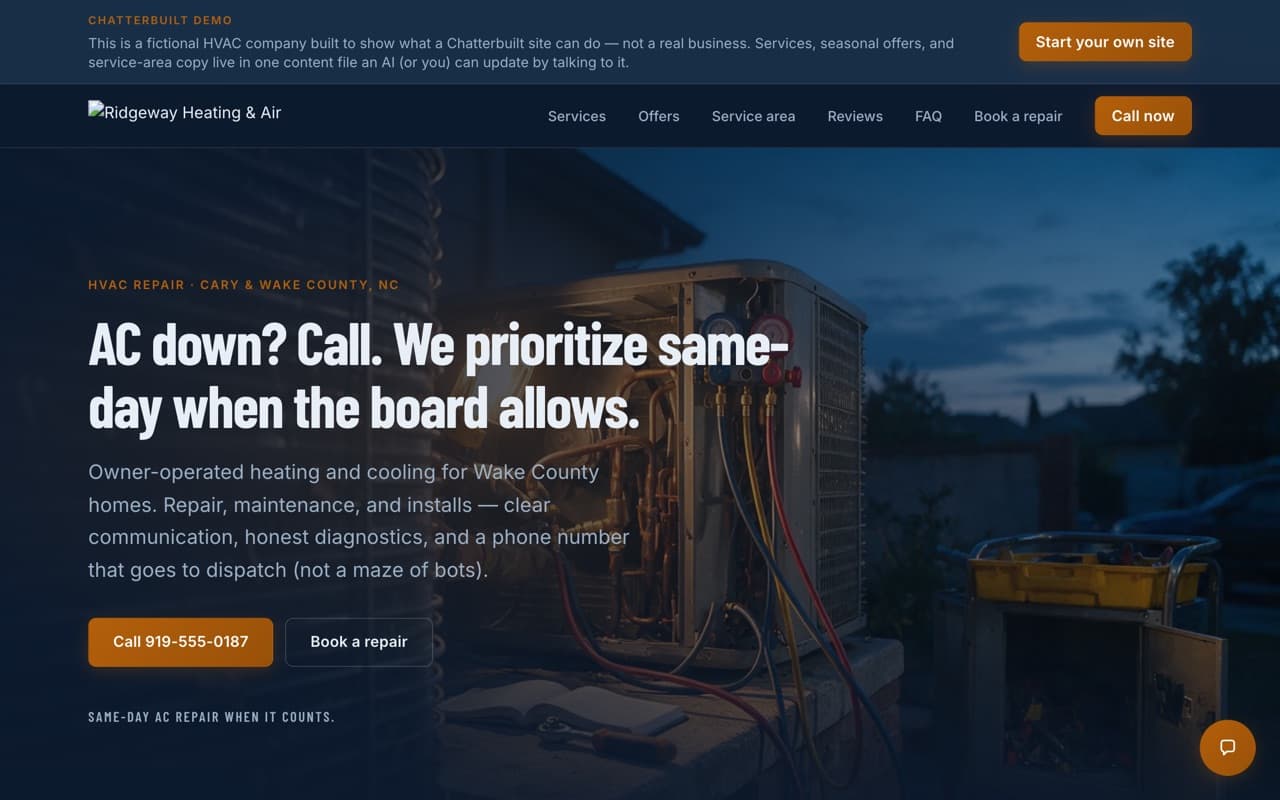
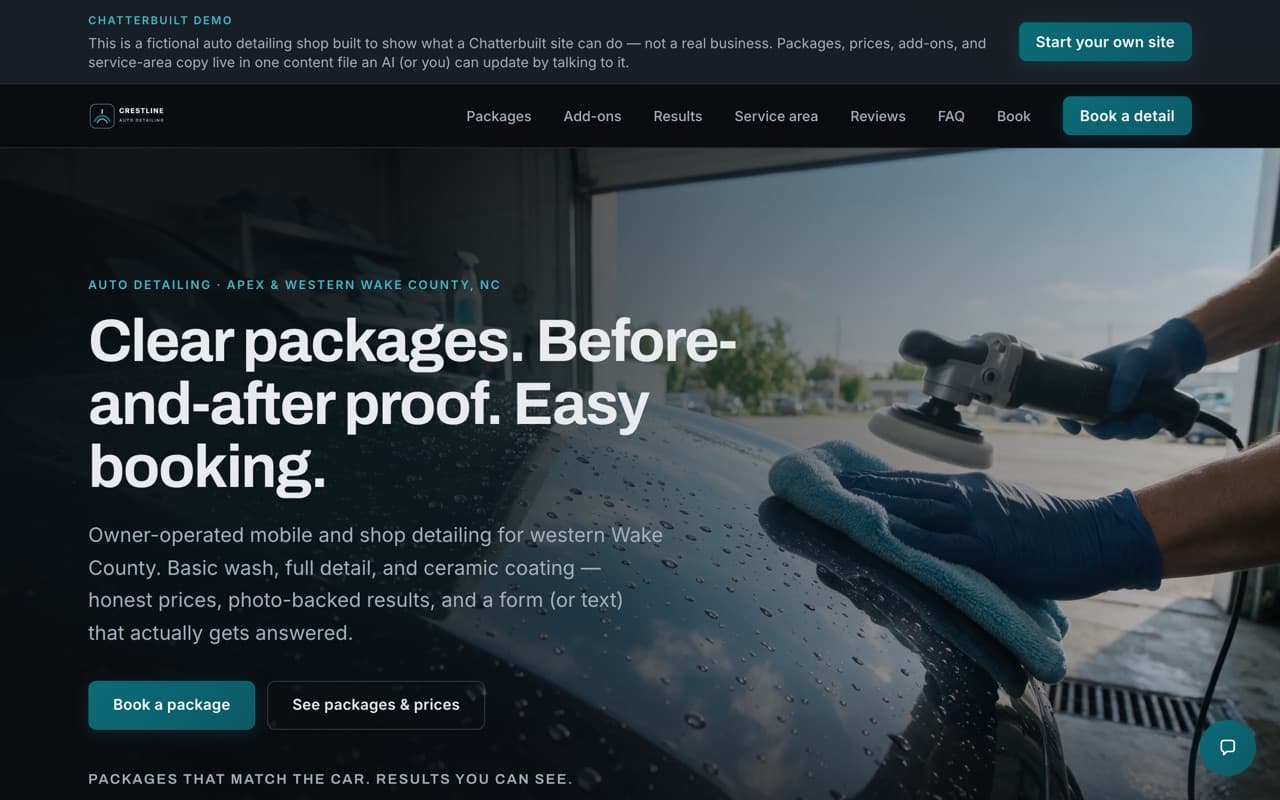
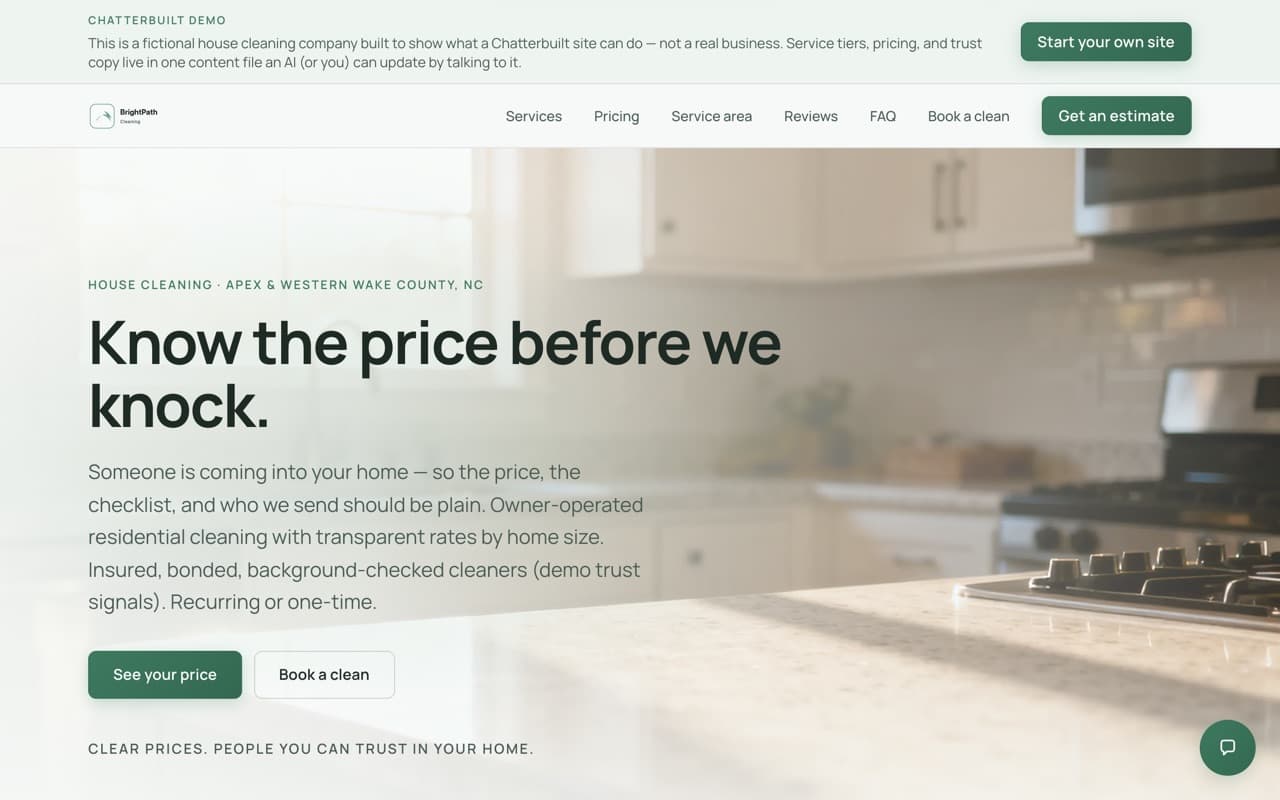
This is what yours could look like.
Four sites built on the real Chatterbuilt template — click any of them and poke around. They are demo businesses, not customers, and each one says so at the top of its own page. The template is the same one your site would start from.
Proof, not promises
Inspect the work before you believe the pitch.
Seven working demos
Open the sites. Check the pages, service areas, galleries, menus, and forms. They are fictional businesses, clearly labeled as demos, running on the same template customers start from.
Open all seven demos →Your accounts, not ours
The website files, hosting project, and domain remain under customer-controlled accounts. Leaving Chatterbuilt ends access to our hosted tools and updates; it does not remove the deployed site.
The math
The usual quote starts at $3,000. The build is the part you stop paying for.
Not a discount — a different bill. The build is the expensive part everywhere else, and it is the part your agent does. What is left is what the providers charge, and you pay them directly, on your own accounts.
The usual way
Industry estimate for a professionally built small-business site. The monthly figure is a managed maintenance plan, not an unavoidable charge.
- Build it
- $3,000–$15,000
- Maintenance plan
- $50–$500 / month
About $600–$6,000 a year, every year.
This way
What the providers charge. You hold each account.
- Build it
- $0
- Domain
- about $1 / month
- Hosting
- $0 personal / ~$20 commercial
- Contact-form email
- $0
- Chat + visitor stats
- $0
From about $11 a year. Hosting tier is the one real variable.
These are run costs paid to third parties on your own accounts, not what Chatterbuilt charges — access is included with a paid AI Enterprise subscription, and the FAQ below spells that out. Free hosting tiers are for personal projects; a business site may need a commercial plan.
Build and maintenance figures: jim.com, 2026 — Third-party industry estimates, not our guarantees. Your costs depend on your business.
What it actually costs you
You finished the last job at 6. Dinner was at 8. Now it's 10 and you're at the kitchen table doing the part nobody pays you for — the invoice that never went out, the caller you never rang back, the website that still says you close at 4. None of it is the work. All of it is your evening.
Why
AI should give you time back — not take ownership.
If the cure for late nights is another platform you can never leave, it is not much of a cure. Chatterbuilt takes work off your plate while the website stays in accounts you control.
Rent the intelligence. Keep the asset.
Inside a bigger company, it's the same evening
You run a team with its own budget, its own customers, and its own reasons to move fast. IT isn't the enemy — IT has a queue. So your team's site is two quarters stale, your pipeline lives in a spreadsheet somebody owns personally, and the project plan is a deck. You don't need to become the AI person for your department either.
So we built an AI company that does the work and lets you keep it.
How
Tell it. See it. Own it.
Three plain rules turn a chatbot into the Chatterbuilt Webmaster without turning your business into somebody else's property.
Tell it
Ask ChatGPT or Claude the way you'd ask a sharp employee: "we close at 5 on Fridays now" or "put these kitchen photos on the site."
See it
The working method keeps changes in a draft, runs the checks, and gives you something concrete to review before you approve a release.
Own it
The files live in your GitHub. The site runs in your Vercel account. The domain is in your name. Chatterbuilt doesn't own your site.
- ClaudeConnected
- ChatGPTConnected
- GrokConnected
- OpenClawConnected
- NemoClawConnected
- HermesConnected


Connected means Chatterbuilt has a working connection path. ChatGPT and Claude have documented setup paths today. The others use the same open MCP connection where they support custom MCP servers; setup and client support can vary.
How a change actually ships
A generated website is easy. A website you can safely change two years from now is an asset.
You say what changed
In plain words, in whatever assistant you're already in. No editor, no blocks to drag, no ticket.
It drafts on a branch
Never straight into the live site. The work happens off to the side where nothing customer-facing can break.
It checks itself
A free validator and the build have to pass first. The safety check is free for everyone — we don't paywall the part that stops mistakes.
You review the draft
The workflow is designed to give you a concrete draft to inspect before you approve a production release.
You can ask to undo
Ask to reverse a change and Chatterbuilt prepares the revert for your approval. The history stays in your repository.
That loop is the same whether it's your hours, a new page, or a whole application. It's the boring part, and it's the reason this holds up.
The reason this is different
Fire us tomorrow. Your website still runs.
Your website's files are in your GitHub. Your hosting is in your Vercel account. Your domain is in your name. The deployed site is not hosted by Chatterbuilt.
If Chatterbuilt vanished tomorrow, another developer — or another capable AI — could pick up the files and keep going. You would lose our hosted tools and future updates, not the website. Domain costs continue, and a business site may require paid commercial hosting.
The department
Nine jobs. One place to ask.
Hire a back office and you're really hiring a list of jobs. Here's the list — the job first, because that's what you actually need done. The product name is in the description, and the chip tells you whether you can use it today.
On the way
Answers the phone when your hands are full
In developmentThe Chatterbuilt Answering picks up, answers from your site's own facts, books the job mid-call, and texts the caller a confirmation before they hang up.
Details →Fixes what AI says about you
In developmentThe Chatterbuilt Marketing — powered by AnswerRank — watches how ChatGPT, Perplexity, and Google AI Overviews describe your business, then ships the corrections.
Details →Keeps track of every lead and follow-up
In developmentThe CRM holds contacts, pipeline, notes, and the follow-ups you meant to make. Ported from a version already running inside ConferenceOS.
Runs the jobs from start to finish
In developmentProjects gives you milestones and assignable tasks, plus reusable playbooks for the jobs you run over and over. Also ported from ConferenceOS.
Builds the tools the business needs
In developmentChatterbuilt Coder goes past websites into real tools and apps — with a real release lifecycle behind it. Every change is a branch, a preview, and a one-sentence undo.
Runs the whole crew so you don't have to
In developmentChatterbuilt Foreman is the chief of staff. It supervises the others, sends one weekly receipt, and texts you only when a call needs an owner.
Details →Shows you where the business stands
In developmentMission Control is the optional one screen, for when you'd rather look than ask: where things stand, what you said you wanted, and what's planned next.
Works with the site you already have
In developmentWordPress support points the same back office at a WordPress site. It's a decision, not a design yet — we'll describe how it works when we know.
The keystone
Every department has somebody running it. Yours won't be you.
A back office with eight workers and no supervisor is just eight more things to check. Chatterbuilt Foreman is the one that runs the others — it starts already knowing your business, keeps one set of facts straight across the site, the phone, and the pipeline, and handles the routine work without asking.
One weekly receipt
Calls answered, leads captured, jobs booked, how AI describes you. Not a dashboard you remember to open — a report that shows up.
A text for judgment calls
Money, complaints, anything it hasn't seen before. It stops and texts you. You answer the text; it acts on your answer. That's the whole interface.
And a list of things it never does alone
- Sign anything — contracts, terms, agreements
- Touch payment credentials or spend past the cap you set
- Delete your data or take your site offline
- Hire, fire, or answer a legal threat
- Give itself more rope — you decide when it's earned more, never it
Chatterbuilt Foreman is not built yet. Not in beta, not in preview — not built. We describe it in the future tense because that's the honest tense, and signing up is free.
See how Chatterbuilt Foreman will work →Before you get excited
Here's exactly what you can use today.
The Chatterbuilt Webmaster is live and shipping. That's the whole live list — one item. Chatterbuilt Answering, Chatterbuilt Marketing, and Chatterbuilt Foreman are In development. CRM, Projects, Chatterbuilt Coder, and Mission Control are specified and not started. WordPress is a decision, not a design.
The proof we can offer is this page. chatterbuilt.com is built and maintained by the Chatterbuilt Webmaster, in one content file, updated by chat. If the pitch were false, this page couldn't exist.
Put the live one to workWhy we built it
The person who built this couldn't code either. AI closed the gap — idea to working product by talking. Now the same path is yours: a real website you own, without learning software or renting a cage.
Read the story →FAQ
Straight answers.
Will I rank #1 on Google?
Nobody can honestly promise that — not us, not an agency. What your AI does is walk you through current best practices so you're doing everything right that's in your control.
What is agent-native?
Agent-native means your AI assistant is the primary way you use the product. You don't log into a dashboard to edit pages — you talk to Claude or ChatGPT, and Chatterbuilt gives that assistant the tools to build and maintain a real website.
Which AIs work?
Any AI that can use a connection. Claude and ChatGPT are first-class. Free tools work without a license key.
Do I need to code?
No. Your AI does the technical work. You answer brand and business questions, approve what goes live, and own the GitHub and Vercel accounts.
Who owns the site?
You do. Your website's files on GitHub, your Vercel project, your domain, your analytics.
What if Chatterbuilt disappears?
Your site keeps running. It's standard code in your own GitHub and Vercel accounts — not locked inside ours. If we vanished tomorrow, any AI assistant or human developer who knows Next.js could keep maintaining it. You lose our product updates, not your website.
Can I see changes before customers do?
Yes. Every change gets a private preview link first — that's the professional staging/production workflow, built in by default. You look, you approve, then you say make it live. Draft first. Live when you say.
Does it set up Vercel and GitHub for me?
You create the two free accounts yourself — about five minutes. Passwords and passkeys stay yours; no AI should own your accounts. Then your AI does the rest: creates your website's files, connects hosting, sets your domain, wires the settings. You hold the keys. It does the driving.
How do I add my photos?
Drop them straight into the chat with your AI agent — ChatGPT and Claude both accept image uploads. Your agent places them on the site, sized and captioned. Phone → chat → live. No separate uploader. No media library to manage. Under the hood, the agent commits the media files directly to your site's file repository. Your agent can also generate professional images (hero art, seasonal banners) on request.
Can my agent make video for the site?
Yes. Your agent can create and edit short video with today's AI video tools — a 15-second special-of-the-week clip, a before/after reel — and your site displays and embeds it. Honest note: video generation uses your agent's own tools and credits; Chatterbuilt handles hosting and embedding on the site.
How much does Chatterbuilt cost?
Chatterbuilt isn't for sale on its own — it's included. Full access comes with a paid subscription to The Artificially Intelligent Enterprise newsletter (theaienterprise.io), which also includes the weekly revenue and time-saving guides. Free tools — the validator, ask-the-manual, and the public template — stay available to everyone. You still pay ordinary run costs for a site (domain about $11/year; starter email can stay free, and hosting is free on a personal plan (a business site may need a commercial one, about $20/month)).
Can it manage my social media too?
Not yet — and we'll tell you straight when it does. On the roadmap is a social media manager that uses your Chatterbuilt site as its source of truth, so the same agent that runs your website writes your posts in your voice. That's where we're headed, not what ships today. In the meantime, the assistant you connect can already draft social posts from your site's content — see the guide for copy-ready asks.
Kickstart
One prompt starts it
After you connect, paste this into Claude or ChatGPT. Your agent interviews you, builds a draft, and shows a private preview.
You are helping me set up a Chatterbuilt website — a site I own in my GitHub and Vercel, that I update by talking to you.

If you can use MCP tools, connect to https://mcp.chatterbuilt.com/api/mcp (no key needed for free tools). Call start_here for ordered next steps, then run setup-my-site / the brand interview.

If you cannot connect, open https://mcp.chatterbuilt.com and follow Getting started.

Interview me about my business: name, what I do, who I serve, services, hours, voice, and any photos or domain I already have. Build a draft from my answers, show a private preview, and wait for my go-ahead before anything goes live.

After the draft validates: call add_integration_recipe with name local-seo-aeo-checklist for NAP, LocalBusiness schema, service area, reviews, and llms.txt (no Google OAuth; no ranking promises).

Never push production without my approval. Preview branch first; I merge when it looks right. Free tools work without a key — ask before adding a license key for full access.Put the Chatterbuilt Webmaster to work without handing over the keys.
Paste the connection command into ChatGPT or Claude. The free tools work without a key, and the Chatterbuilt Webmaster prepares your first draft in accounts you control.
Connect ChatGPT or Claude